
03Representative Workflow
Production Artwork
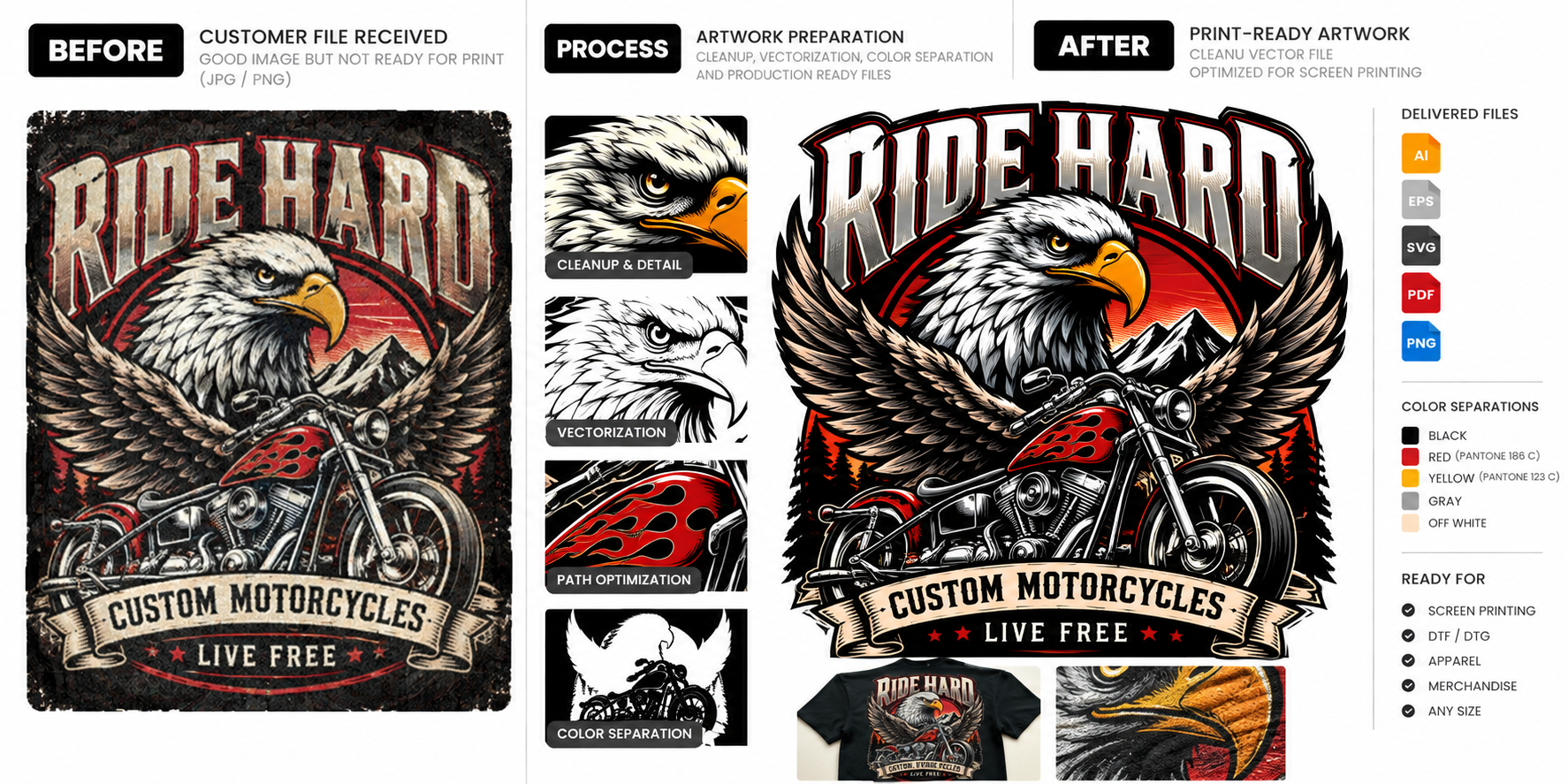
Ride Hard artwork cleanup and preparation for production workflows.
Have a file like this? Send it to MonkArtwork Support / DTF & Apparel Printing
DTF can reproduce detailed graphics, but the process cannot restore information that isn’t present in the source file. Monk helps clean, rebuild and prepare customer artwork before it moves further into the production workflow.
Common Artwork Problems
How Monk Helps
We review the source files, intended application and production specifications to define the right artwork work.
Production Considerations
Increasing image dimensions does not automatically recreate missing detail. When the source is insufficient, redrawing or reconstructing the artwork may produce a more usable result.
Artwork Demonstration
Monk-created sample artwork illustrating a typical preparation workflow. This is a demonstration, not a client project or proof of a particular machine setup.
Ride Hard artwork cleanup and preparation for production workflows.
Have a file like this? Send it to MonkWorkflow
Share files, references, production requirements and deadline.
We confirm the artwork scope, output formats, pricing and estimated turnaround.
Work begins after scope and payment are confirmed. Files are reviewed against the agreed requirements before delivery.
Recurring Support
Recurring DTF artwork problems can be handled through an ongoing artwork workflow.